

Site Audit
Why it matters
AI answer engines read your pages the same way a search crawler does, then decide whether to cite, quote, or send an agent to them. A page that's technically broken, thin on content, or missing basic accessibility signals is harder for AI to trust and easier to skip.
Site Audit crawls your site and scores every page so you know exactly which ones are AI-ready and which ones need work, before you spend effort chasing citations elsewhere.
Starting an audit
- Go to Site Audit in your dashboard
- Click Start new audit
- Choose how to discover pages:
- Crawl from sitemap.xml (recommended): Enter your sitemap URL and Ranketta discovers every page listed in it
- Crawl automatically: Ranketta starts from your homepage and follows links
- Add pages manually: Start with an empty audit and add pages one by one
- Click Start Audit

While an audit is running, you can stop it at any time. Pages already analyzed are kept; only the pages still queued are skipped.
The three scores
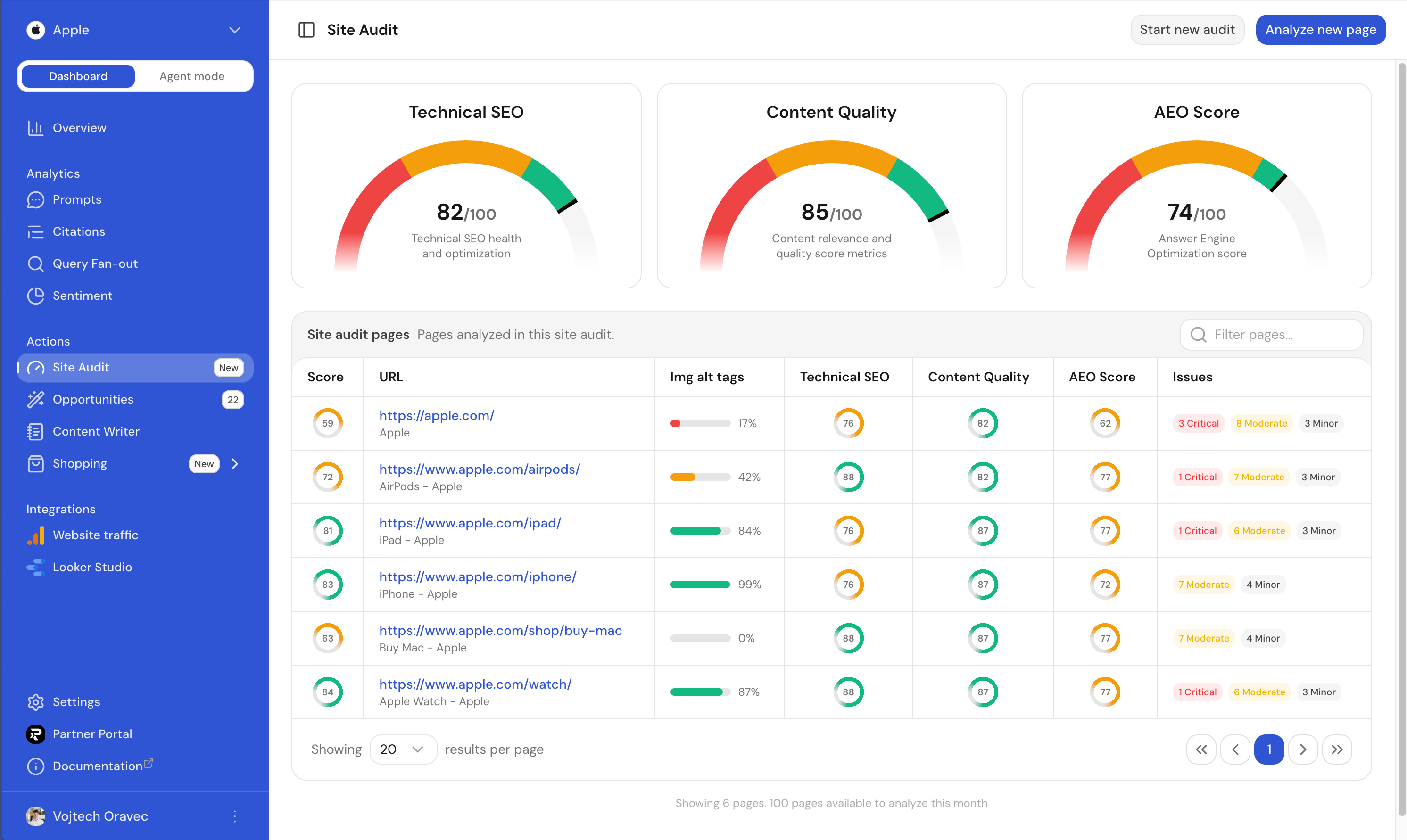
Every page gets three independent scores from 0–100:
| Score | What it answers |
|---|---|
| Technical SEO | Is the page technically sound: crawlable, correctly structured, free of the basic issues that block search and AI crawlers alike? |
| Content Quality | Is the content substantive and relevant enough for AI to summarise and cite confidently? |
| AEO Score | Answer Engine Optimization score: how well-suited the page is to be picked up, quoted, or cited when an AI answers a question your content is relevant to. |
Per-page breakdown
The pages table shows, for every page in the audit:
| Column | What it means |
|---|---|
| Score | The page's overall score, combining all three axes. |
| URL | The page address and its meta title. |
| Img alt tags | What share of the page's images have descriptive alt text. |
| Technical SEO | The page's technical health score. |
| Content Quality | The page's content score. |
| AEO Score | The page's Answer Engine Optimization score. |
| Issues | Flagged problems on the page, counted by severity: Critical, Moderate, Minor. |
Click any row to open the full breakdown for that page, including every flagged issue written in plain language and tied to the thing that's actually wrong.

Analyzing a single page
You don't have to run a full crawl to check one page. Click Analyze new page, enter a path on your domain (for example pricing), and Ranketta scores just that page. This is the fastest way to check a landing page right after you publish or edit it.
Best practices
- Start with the pages that drive the most AI-relevant traffic or citations, not necessarily your highest-traffic pages overall
- Fix Critical issues first: they're the ones most likely to keep AI from citing the page at all
- Re-run Analyze new page after an edit to confirm the fix landed
- Pair Site Audit with Actions: audit tells you what's broken, actions and Agent mode help you prioritize and fix it
FAQ
Does Site Audit fix issues automatically, or just flag them?
Site Audit identifies and explains issues; it doesn't fix them for you. Each flagged issue is written in plain language and tied to what's actually wrong on the page. Pair it with Actions or Agent mode to prioritize and act on the fixes.
How long does a full audit take?
It depends on how many pages are discovered and crawled, so there's no fixed duration. You can stop an audit at any time. Pages already analyzed are kept, and only the pages still queued are skipped.
Do I need to re-run a full audit after fixing one page?
No. Use Analyze new page to re-check just that one page after an edit. There's no need to run a full crawl again.