

What is Query-fanout
Why it matters
When you track "What is the best project management tool?" AI might internally search for keywords like:
- "best project management tools"
- "project management software comparison"
- "PM tools recommendations"
Query-fanout shows you these variations and how each performs across different AI platforms.
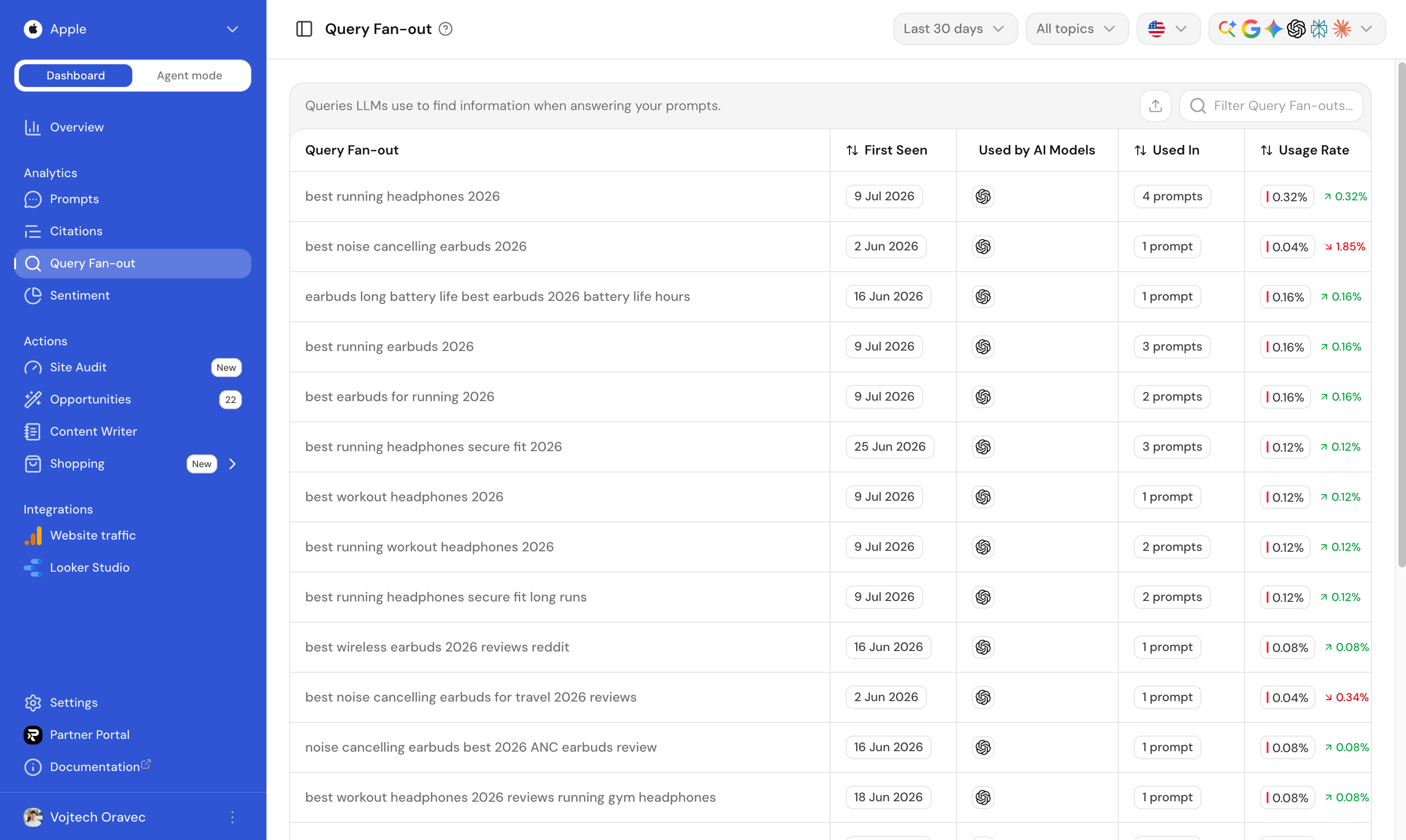
What Ranketta tracks
- Query variations: The actual queries each AI platform uses
- Share by platform: How often each variation appears per platform
- Performance by query: Visibility and sentiment for each variation
How to use it
Use the Query Fan-out tab on any prompt to:
- See how different AI platforms phrase your prompt
- Identify which variations perform best
- Understand why visibility might differ across platforms
This helps you optimize your content for the queries AI actually uses.
FAQ
Can I add fan-out queries manually?
No. Fan-out queries are generated by the AI platforms themselves as they work out how to answer your prompt, not something you write or edit. That's the point: they show you what AI already searches for, so you can target it.
Why do different AI platforms generate different fan-out queries for the same prompt?
Each AI platform has its own way of expanding a question into search queries. Query Fan-out surfaces exactly those differences, so you can see how ChatGPT, Gemini, and other platforms phrase the same underlying question.