

Proposals
Proposals is where AI does the heavy lifting on your catalogue and you do the deciding. For every product Ranketta enriches, our agents look at the data you already have, propose better titles, descriptions, categories, GTINs and other fields, and drop the suggestions here for you to review.
You stay in control. Nothing in your feed changes until a proposal is approved, either by you, or automatically if you've raised the auto-approval bar in Settings.
What gets proposed
Today the agents focus on the fields that move the needle most for AI shopping:
- Title: rewrite weak titles with the brand, key specs and intent that drive AI mentions.
- Description: generate a substantive PDP description when yours is empty, thin or scraped.
- Category & tags: map products to the standard Google product taxonomy and add searchable attribute tags.
- GTIN: suggest a GTIN/EAN/UPC when one can be confidently derived (never guessed).
- Attributes: fill in descriptive attributes (material, colour, size profile, etc.) the source feed left blank.
- Shopping attributes: marketplace fields like condition, gender, age group, bundle and multipack.
Each proposal is one field on one product. A single product may produce several proposals at once.
Confidence
Every proposal carries a confidence score between 0 and 100%. It's a calibrated estimate of how likely the suggestion is correct. A proposal at 95% means the agent is highly grounded in source data; lower scores mean the agent had to interpret across multiple signals or could only partially verify the change.
You can:
- Review them all manually at any threshold.
- Auto-approve at a threshold (e.g. 95%+) so the obvious wins ship without your time, and only the borderline cases land in your queue. The threshold lives in Settings.
A safe starting point is auto-approve at 95% for a week, then gradually lower it once you've built trust with the agents on your catalogue.
The review screen
Proposals are grouped by product. Expand a product to see every field change (title, is_bundle, GTIN, …) with confidence and a short preview — no need to open the detail panel just to learn what changed. Approve or reject the whole product in one click, or multi-select products and bulk-approve from the sticky bar.
Each field still opens a clear before / after view in the detail panel: current value, suggested value, confidence, and a short reason.
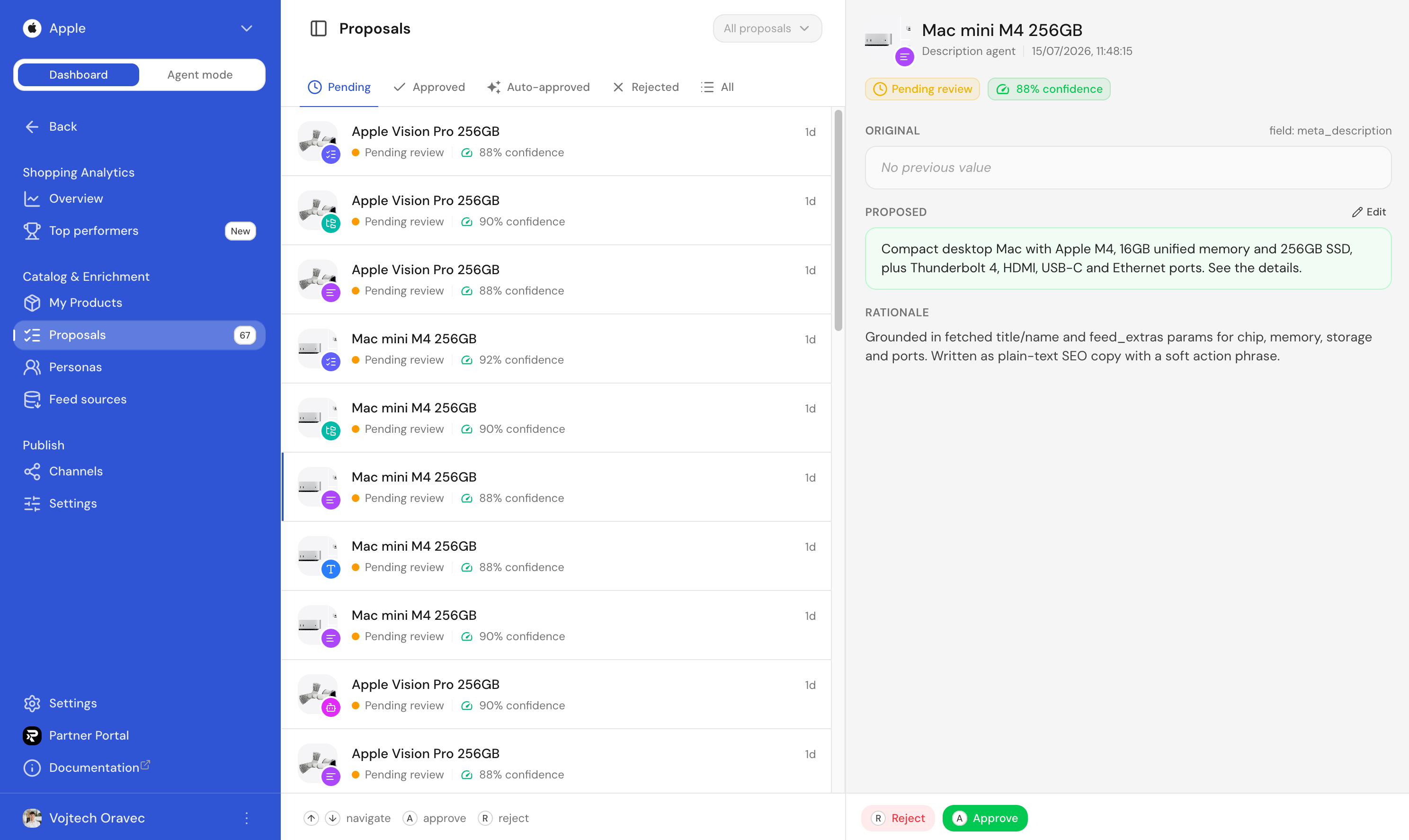
Filter the queue by:
- Status: Pending (awaiting you), Approved, Auto-approved (applied automatically when confidence meets your threshold), Rejected, All.
- Product search: name or SKU.
- Product categories: taxonomy paths on the product.
- Proposal type: title, description, category & tags, GTIN, attributes, shopping attributes.
Keyboard shortcuts
The queue is built for speed. Most teams clear an entire batch in minutes:
| Key | Action |
|---|---|
| A | Approve the current proposal |
| R | Reject the current proposal |
| ⇧A | Approve all pending proposals on the current product |
| ⇧R | Reject all pending proposals on the current product |
| ↑ / ↓ or K / J | Move to the previous / next proposal |
Approved values are written to the product immediately and flow through to your connected channels on their next refresh. Rejected proposals are dropped (the agent will not re-propose the same value over and over).
Per-product review
You can also review proposals one product at a time. Open any product in My Products, switch to the Proposals tab in the slideover, and approve or reject inline. Useful when you want to clean up a single SKU end-to-end before moving on.
FAQ
Does rejecting a proposal mean the AI will try again with a different suggestion?
No. Rejected proposals are dropped, and the agent will not re-propose the same value over and over.
Does approving a proposal update my actual store/feed, or only Ranketta's copy?
Approving writes the value to the product in Ranketta immediately and flows it through to your connected channels. It reaches your store or marketplace once that feed is picked up there (feed URL mode) or on the next push (direct connection), not instantly inside your store's own admin.
Feed sources
Plug in your existing product feed and Ranketta will keep your catalogue in sync. Supports the formats every Czech and global e-shop already speaks.
Channels
Publish your enriched catalogue to Google Merchant Center, Amazon and other marketplaces, either as a self-hosted feed URL or a direct, always-in-sync connection.