

My Products
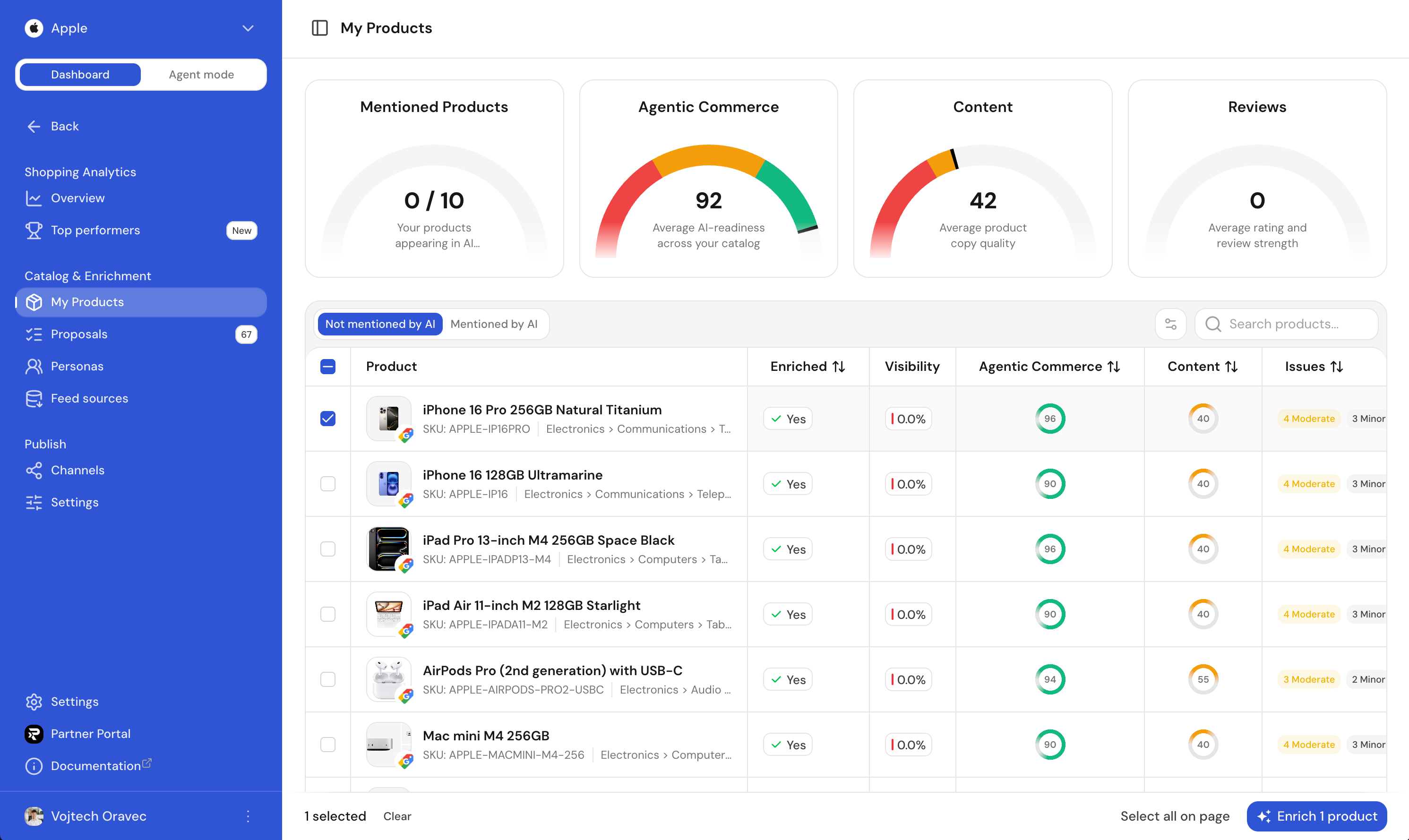
My Products is your working catalogue inside Ranketta. Once you've connected at least one feed source, every product lands here and gets scored on three axes that matter for shopping feeds and AI shopping agents. The ones that score worst are usually the ones agents struggle to surface, or refuse to surface at all.
Why your feed quality matters now
AI shopping agents (the recommender inside ChatGPT, Gemini, Copilot and the new wave of agentic checkout flows) don't just read text, they need to transact. They look for a clean identifier, a reliable price, an in-stock signal, an unambiguous brand and a place to send the buyer. If any of those signals are missing or fuzzy, your product gets quietly demoted in the answer.
The catalogue you ship today was almost always written for keyword search and human shoppers. My Products tells you exactly where that catalogue is letting buyers and agents down.
The three product scores
Each product gets three independent scores from 0–100. They're computed from the data already in your feed, so refreshing a feed re-scores everything immediately.
| Score | What it answers |
|---|---|
| Essentials | Are the required listing fields present and usable? Looks at id, title, description, link, image, price, currency, and availability. |
| Identifiers | Can the product be uniquely matched and classified? Looks at brand, GTIN/MPN, and category. |
| Product detail | Is the listing rich enough to stand out? Looks at additional images, product highlights, and apparel/variant attributes. |
A high essentials score means the product can be listed and purchased. A high identifiers score means it can be matched across channels. Product detail captures the extra signals that make a listing persuasive.
Issues
Below the scores, every product gets a list of concrete issues, ranked by severity:
- Critical: the product is fundamentally broken for listing or purchase (no price, no URL, no images, no title).
- Moderate: the listing works, but with worse outcomes (missing brand, thin description, no extra images).
- Minor: quality-of-life issues (few highlights, missing apparel attributes, short title).
You don't need to memorise the rules: every issue is written in plain language and linked to the field it refers to.
Two views
- Visible: products that already appear in AI answers in your topics. Good place to look for the SKUs that are working for you, and to push the borderline ones over the line.
- Invisible: products in your catalogue that AI is not surfacing. These are usually the ones with the biggest score gaps. Fix them and they start showing up.
Merchants per product
Each product can be sold by multiple merchants (your store, Amazon, partner resellers, etc.). The catalogue surfaces the favicon of every merchant we've seen carry it, so you immediately know whether AI has alternatives to your offer.
Drilling into a product
Click any row to open the product slideover. From there you can:
- Read the full breakdown of stats, attributes and issues.
- See the per-merchant list with prices and product URLs.
- Trigger AI enrichment manually and watch the resulting proposals appear in the Proposals tab inside the slideover.
Manual enrichment is the fastest way to see what the AI agents would suggest for a single SKU before turning on background runs in Settings.
FAQ
Do product scores update automatically, or do I need to trigger enrichment manually?
Scores update automatically. They're computed from the data already in your feed, so refreshing a feed re-scores everything immediately. AI enrichment (the step that produces proposals) is different: you trigger it manually per product, or turn on background runs in Settings so it happens on its own.
What happens if a critical field like GTIN can't be confidently determined?
Ranketta only suggests a GTIN when it can be confidently derived, it's never guessed. If it can't be determined, the product simply keeps its Critical "missing GTIN" issue flagged rather than getting a proposal you can't trust.